Aug 12 2011

Planned features for RICcreator

Category: Lego,Mindstorms,RICcreator,SoftwareSpiller @ 22:18

A great trip to Ireland has ended, a trip without my computers, music and anime. However not being completely able to detach myself from everyday life I found some paper and a pen and compiled a list of features I want to add in RICcreator.

So while not complete and subject to change, here is the most important features to be done:

Features to be done before Alpha release:

  • VarMaps must be editable. I cannot drag this out any longer, so I will go with an interface similar to what is found in nxtRICedit. The entries will use the left part of the screen, with the graphical view on the right. (Graphical view will automatically swap x-y axis depending on the available screen area.) Graphical view might first be added in Beta though.
  • Polygon will also be added in a similar way as VarMaps, just with a different graphical view.
  • RICScript import/export support.
  • Export an open file as a C/NXC header file.
  • Support parsing a RIC file from a byte stream internally. This will improve Windows Shell integration and will make it easy to include GraphicArrayOut() in nxtCanvas.
  • Embed default font in EXE instead of require it to be located in the folder. When the two previous features are added, this will be a piece of cake.
  • Improve command-line interface. Support opening several files at once and make it possible to convert files from one format to another.

Features to be done before Beta release:

  • Change preferences dialog (and make preferences global internally).
  • Allow graphically editing Point/Line/Rectangle/… objects like in nxtRICedit.
  • Visual hints in Copybits object, similar to nxtRICedit.
  • Drag-n-drop in the object list widget to move them.
  • Copy and paste
  • Edit history, undo and redo
  • Simple/beginner mode which just shows a nxtCanvasWidget and then manages the Sprite and Copybits element in the background.
  • RIC font edit mode to simplify RIC font creation.
  • Remember recently opened files.
  • Check for updates. (Automatic vs. manually?)
  • Remember RIC parameters.
  • Upload and Download RIC files directly to the NXT.

Any suggestions are welcome.

I have added Trac to the SourceForge project page which I intend to use as a bug tracker instead. The reason for this is because in includes a nice Roadmap page where you can add Milestones. I will try to issue tickets for the features which needs to be done and bugs which needs to be fixed and then add them to the Milestones. It should work as a good TODO list if I remember to use it. I will properly close the old bug tracker when I add a few more tickets to Trac.


Jul 26 2011

RICcreator – July update

Category: UncategorizedSpiller @ 00:50

Another month has passed and truth to be told, that much haven’t happened…

A few thing have been done at least, mostly with the sprite editor.

Import of image files

This feature is pretty important for me, so a quick draft has finally been made:

The options should be done in this order:

  1. Select image
  2. Scale image
  3. Select grayscale conversion method
  4. Change threshold
  5. Cut image

Actually I would want to cut the image before scaling it, as this makes it easier to scale it precisely. It is a bit more work though so this will wait for now.

The second view is a nxtCanvasWidget control, i.e. a nxtCanvas viewer/editor. It should be easy to allow editing the sprite before applying it, you just need to add the tool buttons. I don’t know if this is of interest though.

A lot more work will need to be done on the monotone conversion. Currently a simple global threshold is used (which is automatically calculated btw). I will at least add the possibility of adaptive thresholding and perhaps even edge detection. I will try to look into other filters to see what could be useful.

New nxtCanvasWidget tools

Compared to nxtRICedit, RICcreator is still missing some forms for sprite modification. So a few extra have been added to closing that gap.

The layout needs a helping hand though.

Copy and paste

Together with the selection tool, copying and pasting is now possible. To move the pasted content, you click and drag. To copy it onto the sprite, double click. (Click again and it will paste an extra copy right away.) Invert and Merge options works as well.

Currently a drag operation is started no matter where you click. However clicking outside the copy could be used to apply it onto the canvas, instead of having to double click. (GIMP behavior) I’m not sure what I should go with.

Cropping

The nxtCanvas automatically becomes larger but there was no option to decrease the size. So cropping is now finally added. It auto-crops empty white borders, black borders if Invert is toggled. However it can be used together with the selection tool to crop to a specific area without regarding the contents.

Bucket fill

Has also been added. It is just a quick inefficient implementation though, but it works. Invert also affects this tool of course.

Missing tools

I will only add one more tool, a text tool which works using RIC fonts. When and how I do not know. (And undo/redo someday…)

I might add polygon drawing if there is interests for it though.

If anyone do not think this tool set is sufficient, tell me what you would like to see and I might add it in the future.

Export to PNG

By using File->Export you can now save the contents of the preview. So if you file is parameterized, set the parameters before executing this command.

You can also export the contents of a RIC sprite, by using the save button in the nxtCanvas editor. If used together with the selection tool it will only save the current selection.

Now that I think about it, is there any way to export as a bitmap image in nxtRICedit? Couldn’t quite find the command.

Other additions

Closing RICcreator by other means than File->Exit will now properly prevent exit if there are unsaved files.

You can now open files by dragging and dropping them into RICcreator from your file-browser. You can drag multiple files at once if you want.

Download

Please bear in mind that this is a preview and that there are several known bugs.

RICcreator rev. 119 – win32


Jul 10 2011

Keywriter

Category: Lego,MindstormsSpiller @ 14:18

An old project of mine, from before I got my NXT 2.0 kit. From about 2.5 years ago iirc.

Old description from HDD:

A robot which can write on a computer by pressing the keys on the keyboard.

My original goals

To become more used to make building instructions.
Making it to work on multiple keyboards so it isn’t specific for a single keyboard/working condition.

Making programs that can be modified easily to perform similar tasks.

Making simple and strong constructions.

Never made building instructions…

Should work on multiple keyboard, but remains untested…

Program works by using coordinates, nothing like the “modifiable” program I wanted…

Most of the construction was simple enough though.

Program

The program was made in NQC since it would most likely fail in RIS…

By using the rotation sensors, the motors worked like servos changing speed/precision depending on distance.

Keys were found by using manual entered coordinates…

By using some functions in Windows which are normally for people which have trouble using the keyboard, you can activate a function to press keyboard shortcuts one key at a time. This can be done with shift and uppercase letters so caps lock isn’t needed and furthermore it could be used to control many Windows features directly from the keyboard.

Still, I didn’t continue that far…

Construction

The frame was made simple, long, and strong. The long beams are made of both studded and studless bricks to reinforce each other. So even if the span is over 30 cm, they don’t bend that much.

Wheels are used instead of gearracks on the frame and this works okay…

Photos:

LDraw file can be found on my brickshelf: Keywriter folder

Photos from while I was constructing it can be found this this folder.


Jun 01 2011

Improving nxtCanvas

Category: Lego,Mindstorms,Programs,SoftwareSpiller @ 15:56

After a weeks delay (3 exams, playing Little Busters! for three days, and a bit of piano training) I’m finally able to do some more on RICcreator.

Lately I have been working on nxtCanvas, the class which attempts to emulate the drawing functions on the NXT.

First of all, LineOut() and RectOut() have been optimized quite a bit since they weren’t that well written… (For example, when drawing a filled rectangle, it first drew a normal rectangle and then a filled one inside that.)

Not minding the small stuff, I finally fixed the EllipseOut() implementation. After doing a bit of math it just worked much more like I wanted in a much simpler procedure… I also added fill-shape, so this is now working for both circles and ellipses. To avoid it drawing on some pixels several times it has quite a bit of exceptions, so it needs to be cleaned up someday. But well, it works.

RIC fonts

I have also finally written a simple implementation of RIC fonts. In short, it is just FontTextOut() without any special font copy options. However this much is enough to get a TextOut() and NumOut() working. I made a RIC font which looks like the default font on the NXT and TextOut() simply calls FontTextOut() using this RIC font.

So the Number opcode is now working, meaning only Polygons aren’t fully supported. And I’m not sure when this will be added, because I’m simply unsure on how it should work…

Interestingly, the font I used is different from the one used in nxtRICedit. I based it on the 1.29 standard firmware source and it looks the same when trying it on my NXT. Was the font different in the 1.0x firmwares? For now I’m not planning to emulate how it would look on the standard or older versions of the firmware, but it would be good to know if there is a difference here.

Editing nxtCanvas

I have also done a bit of work on the GUI side.

You can now edit the copy options settings which opens up the possibility of drawing in white, using fill-shape, and XOR drawing:

Scrennshot of the nxtCanvasEdit GUI

There are some performance issues with displaying the canvas. Right now it needs to fully redraw everything each time the nxtCanvas has been changed. It does so by drawing the entire field white and then adds the black pixels. This means the performance decreases the more black pixels there are. (So the performance issues with fill-shape is actually because of the huge black areas.)

There are two solutions to this problem. One is to make nxtCanvas draw directly on the image class QT needs. However since I want to make riclib completely independent on QT for reusability reasons, this is not an option.

The other solution is to only partially redraw the image. It would surely speed up the redrawing but nxtCanvas would need to specify the changes with every drawing operation… I will try to add this some other day.

It might be possible  to take a more low-level approach to this, I will try to look into this and see if it is possible to gain anything by doing that.

EDIT START: Just tried that, made quite a difference… It needs to redraw everything each time this way, so no point in partial redrawing in nxtCanvas. Still slows down with more black pixels, but it should rather be treated as an optimization anyway… EDIT END

Future additions to nxtCanvas

Other than features to speed up redrawing, I’m also planning to make it possible to auto expand the canvas when the drawing operation attempts to draw outside the canvas.  The issue here would be performance though… I’m not going to add it right now anyway though…

There are also a few functions that need to be added, like shrinking the canvas size to the area actually used, and filling an random shape with a color.

VarMaps?

The most important missing feature right now is editing VarMaps. I just can’t come up with a good interface to do this with though. The solution in nxtRICedit works, but I don’t quite like it… There must be some better way to do it, but I’m still on a loss on how this should be…

Well, this is it for now… I will upload a build in a couple of days, I want to add a little bit to the GUI first.

EDIT: it has been uploaded, revision 80.

EDIT2: I forgot to upload the font file together with it, fonts will not draw without it…  Will be fixed in the next release. For now, you can place a ricfont named “font.ric” together with the .exe, it will use that one. If you really want to test it out…


May 22 2011

RICcreator released

Category: UncategorizedSpiller @ 20:51

Currently there is only one real editor to use with the Lego Mindstorms RIC format, nxtRICedit v2 by Andreas Dreier. All other editors, including Lego’s own, only edits the sprite while the format is actually much more advanced than this.

There are a few issues with nxtRICedit though and this made me to try writing my own editor; RICcreator is the result of this attempt. (currently in development)

There are a few clear goals with this project:

  • Cross-platform,it  should work on Mac, Linux and Windows.
  • Open-Source, so it is easier to incorporate the format in other applications or continue to improve the program even if the original developer loses interest.
  • The user must be able to do everything the format supports.
  • It should support John Hansen’s additions to the format.
  • The program window must be resizable.
  • It should make the creation of RIC fonts easier.

RICcreator is available through SourceForge here: http://sourceforge.net/projects/riccreator/

The program is written in C++ using QT for the GUI. The code that handles the RIC format is kept separate and does not use QT in any way which should make it easier to reuse it.


Apr 28 2011

Toy plane

Category: LDraw,LegoSpiller @ 20:18

I haven’t posted anything for a while since I’m currently busy with finishing my exams projects. So I brought up a little thing from the past. Quite a few years actually (so I’m sorry about the dust ;) ).

Back in the days I loved the platform game  “Toy Story 2: Buzz Lightyear to the Rescue” (from 1999). In the third level (video here) there is this toy plane which I happened to like even though I hated the level of some reason. So I made a small scale model in normal Lego:

Photo of the model

LDraw file (with steps) is available from my Brickshelf account. (direct link)

I haven’t really made a lot of small scale models (and therefore certainly don’t have any skills with it yet) however this is the only type of  Lego other than Technics/Mindstorms that still interests me today. For example this model of Suiseiseki from Rozen Maiden is just fascinating. (Well, perhaps I just don’t want to admit that I don’t have enough Lego…)

I just recently got my hands got my hands on a SLR camera however since I’m quite new to this I didn’t manage to get the depth of field correctly.  Well, I will figure it out someday… EDIT: someday was apparently the day after that as I found out how to change the setting by accident…


Mar 05 2011

Writing NXC code in Notepad++

Category: Lego,Mindstorms,NXC,SoftwareSpiller @ 19:21

When writing programs in NXC I prefer using Notepad++ instead of BricxCC as the text editor. Notepad++ isn’t a IDE though so you can’t compile it directly in the program. However Notepad++ comes with a plug-in called NppExec that can execute other programs and we can use this to start the command line compiler (nbc.exe) directly in Notepad++.

Compiling files with NppExec

NppExec is a rather powerful plug-in which can do a lot for you. To start it up, simply press F6 (or find it in the menu, Plugins -> NppExec -> Execute…).

The NppExec main window

The big multi line textedit field will contain all the commands you want to execute. Each line is a separate command which will be executed after each other, starting from the top. To get started, we need to find nbc.exe’s location. It is in the same folder as BrixcCC which is normally:

"C:\Program Files\BricxCC\nbc.exe"

(The quote marks are necessary if  there are spaces in the path, they are NOT optional!)

First of all, as this is a command line compiler (because that is the reason we are using it), we need to know which parameters it takes. To do this, enter the following command in NppExec:

"C:\Program Files\BricxCC\nbc.exe" -help

(To get a command line program’s supported parameters, you often write “-help”, “-h” or “/?”. (To get a list for NppExec, simply write “help”.)) The result should look something like this:

The NppExec command line window

Notice the syntax: nbc.exe options filename options

So after nbc.exe you can place parameters (options), then the filename and after that more parameters. (I prefer having all the parameters together though.) The most important parameters are:
-d, which will compile and transfer (download) the program to the NXT.
-r, the same as -d, but will also start (run) the program when done.
-Z[1|2], this will turn compiler optimizations on, -Z2 is recommended.
-EF, if you are using Enhanced Firmware, remember to add this one.
-v=n, this specifies the version of your firmware. This apparently defaults to NXT 2.0 firmware now, so you most likely doesn’t need to specify it. (Otherwise write -v=128)

(I haven’t tried downloading over Bluetooth so don’t know how this is done. You might need to use the -S=portname parameter…)

So in order to compile your NXC file and download it, you write this in NppExec:

"C:\Program Files\BricxCC\nbc.exe" path_to_your_file -d

where “path_to_your_file” is the file path to the NXC file you want to compile. If you want to use Enhanced Firmware and compiler optimizations you can do it like this:

 "C:\Program Files\BricxCC\nbc.exe" path_to_your_file -d -EF -Z2

Everything we have done here is possible to do in the command prompt, if you try to run the commands in the command prompt it will work as you expect. However there isn’t much point of doing it in NppExec if you just use it as if it was a command prompt…

Taking advantage of NppExec

The first thing we want to avoid is to having to change “path_to_your_file” every time you need to compile another file. NppExec contains some macros that can help us with this which take the form: $(NAME_OF_MACRO) where “NAME_OF_MACRO” is the macro you want to use. The one we want to use is FULL_CURRENT_PATH which will be replaced by the file path of the document you are currently viewing. We simply needs to use this instead of “”:

"C:\Program Files\BricxCC\nbc.exe" "$(FULL_CURRENT_PATH)" -d

Notice that there are quotes around the macro. These aren’t necessarily needed, however as said before, if there are spaces in the file path you need to have them. Add quotes every time you automatically inserts something that can contain spaces, better safe than worry.

Saving files

One thing you need to be aware of is that it uses the file saved on the hard disk, so if you have made changes to the document and have not saved it yet, those changes will not be known by the compiler. So you will either have to remember to save or use the NppExec “NPP_SAVE” command which automatically saves the current document. You place this command on its separate line before your call nbc.exe:

NPP_SAVE
"C:\Program Files\BricxCC\nbc.exe" "$(FULL_CURRENT_PATH)" -d

Improving NXC integration

Turning off compiler status messages

nbc.exe writes quite a bit of status messages in the console window which I aren’t really interested in normally, however you can turn those of easily by adding the parameter “-sm-“:

"C:\Program Files\BricxCC\nbc.exe" "$(FULL_CURRENT_PATH)" -d -sm-

Reducing the shown amount of compile errors

The command window autoscrolls so if you get 50 errors you will have to scroll all the way up again. You can set a limit on how many you want to be displayed with the -ER=n parameter (where n is the maximal amount).

"C:\Program Files\BricxCC\nbc.exe" "$(FULL_CURRENT_PATH)" -d -sm- -ER=5

(It seems it that nbc.exe didn’t output the error messages to the console in some of the older versions, but you can store the error messages to a file with the -E=filename parameter and then display this file in the console.)

Making the compile errors easily readable and add goto line

Right now the compile errors is a bit hard to read, however you can add coloring rules to make it more clear. Go to “Plugins -> NppExec -> Console Output Filters…” and a dialog window with three tabs appear which you can filter some of the lines out or only allow certain ones. You can replace text and the last tab, which we are going to use, highlight lines.

NppExec highlight dialog window

Take a closer look at the image to see the changed I made. The column of checkboxes turns the highlight marks on and off, the second column is the rule, the three next ones is the RGB color in hex (which nearly impossible to change, just use “0” and “ff”). The last three colomns with check boxes add Italics, Bold and Underline text decoration.

I will not go in dept with how to make rules though, look in the documentation or just read the text at the bottom if you want to learn how  to make your own. I will however go through the first line:

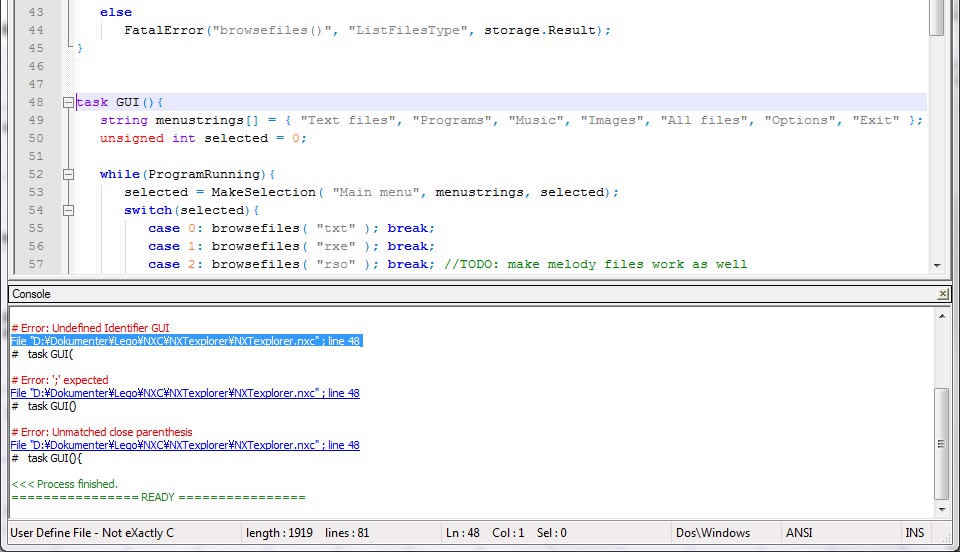
File "%ABSFILE%" ; line %LINE%

The %ABSFILE% part tells that this is an absolute file path and %LINE% tells that it is a line number. The cool thing is that if you double click on that line, it will automatically go the specified line in that document. Jumping to a specific line specified in the console
Make Notepad++ automatically add syntax highlighting

If you open a .nxc file in Notepad++ it will treat it as a text file. To make it recognize the file extension, go into “Settings -> Style Configurator” and select the language you want to use, most likely C or C++. Then in the “User ext. :” box, add “nxc”. (If you want multiple extension, separate each with a space.) Style Configurator dialog window

If you want to use a User Defined language instead, go into “View -> User-Defined dialogue…” and add the extension in the “Ext. :” box.

Function auto-complete and highlighting?

I found a User Defined language once that did this, but its C support wasn’t too good as User Defined languages are rather limited in that aspect. (Which is why I’m just using the standard C syntax highlighting.) Autocomplete worked great though.

I don’t have the link anymore and I think it was posted on nxtasy.org… (And I will not redistribute it without permission from the author.) Does anyone know of a good alternative?

Other stuff…

Saving the compiled .rxe file

It can be done with the -O=filename parameter:

-O="$(CURRENT_DIRECTORY)$(NAME_PART).rxe"

Notice the two new macros and how it is used to create a new file path.

Windows intergration

I have recently studied how to implement your own filetype in the Windows shell, so I’m going to try it out and write it in another post. Adding stuff like being able to compile .nxc files just by right clicking on them in Explorer and such.

It is going to involve manual editing in the Registry using regedit though.

Tags:


Feb 16 2011

Bezier v2.4.0

Category: Lego,Mindstorms,NXC,Programs,SoftwareSpiller @ 00:31

\Quite some time ago, way back to the time of nxtasy.org, I was writing a Bézier curve implementation in NXC. Muntoo was also writing one at the time, you can check his out on his blog, here. His implementation is generally more feature rich, like several different drawing modes, while mine is geared towards pure speed.

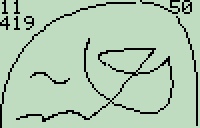
To start it off, here is a screenshot of the current progress:

The process is two-step, a initiation function which calculates some basic stuff which takes 11 msec, and then the drawing functions. In the screenshot there are 10 cubic curves drawn by the general Bézier algorithm which takes 419 msec in total, so ~42 msec per function call in average. (The first draw with a new amount of control points is a bit slower as some of the calculations are reused.)

Right now there is only a general Bézier algorithm, the one I optimized for cubic curves isn’t working correctly…

Implementation – v1.1.0

The general Bézier formula looks like this:

B(t)=\sum_{i=0}^n{n\choose i}(1-t)^{n-i}t^iP_i

So to draw a Bézier curve you would start with t=0, calculate the x and y positions, increment t by 1/”desired precision” and recalculate. This process is repeated until t=1. There is a lot of calculation needed for each t value, yet we might be able to do some of the calculation that doesn’t directly involve t beforehand.
We could for example calculate the binomial for each P and store it in C like this:

C_i={n\choose i}P_i

B(t)=\sum_{i=0}^n(1-t)^{n-i}t^iC_i

Implementation v2.+

NXC is compiled into a bytecode format in which math opcodes are polymorphic. If you try to multiply an array with a scalar, the scalar will be multiplied with each of the elements in the array. This is however a lot faster than manually iterating a loop multiplying each element.

So my idea was to take advantage of this by making an array containing each value of t. Instead of iterating a loop, you would simply do the math operations on this array. The array of t values would also only be calculated once in the beginning of the program, instead of each time you need to draw the curve.

So for the Bézier algorithm there would be two arrays, one containing each value of t and another containing each value of 1-t.

However we want to optimize this further. Since we start at i=0, lets consider that case:

(1-t)^{n-0}t^0=(1-t)^n

We will only need to calculate (1-t)^n, so lets try finding the difference between the first iteration and the next:

(1-t)^{n-1}t^{0+1}

\frac{(1-t)^n}{(1-t)^1}t^0t^1

We can therefore get to the next iteration by multiplying \frac{t}{1-t} into (1-t)^n and into the next iteration by multiplying again:

This fraction can be calculated without knowing n or i, so we can calculate this at the start of the program and reuse it. We will need to calculate (1-t)^n each time we get a new n value (but we can keep the array, so if the next curve have same n value, we also reuse this (and when done right, even the binomial)).

However a small loop is still needed to calculate the sum since ArraySum() isn’t polymorphic. Currently there is also a little bit of multiplication in the loop, but I’m working on removing that too.

The major downside with this approach is that if you use high resolutions the arrays become rather large (and they are using float to boot) so memory usage rise quite a bit. (Some temporary arrays are also needed, so it quickly becomes a few KB.)

Download

Bezier v2.4.0

P.S. I should really have considered reading a tutorial about LaTeX before trying to add all that math which needs to be written in LaTeX…


Feb 09 2011

How to implement OO programs on the standard NXT firmware

Category: Lego,Mindstorms,NXC,SoftwareSpiller @ 23:39

OOP is not at this time supported in NXC. Even though the memory management in the standard firmware might be limiting it is still possible to achieve a simple OOP implementation fairly easily. It will however be a bit inefficient memory wise and you will have the standard issues with tread-safety.

However actually testing my hypothesis in the large scale turned out to be cumbersome and thus I didn’t… If you notice anything that wouldn’t work out, something I forgot to consider or anything, please leave a comment : )

Object representation

The base for every object is a data structure containing all non-static variables. Lets consider a class like this:

class monster{
  public:
    static const unsigned char LEVEL_EASY = 0;
    static const unsigned char LEVEL_MEDIUM = 1;
    static const unsigned char LEVEL_HARD = 2;

  protected:
    unsigned char level;
    unsigned int hp;
    unsigned int max_hp;
    unsigned char attack[];

  public:
    monster();
    ~monster(){
      //The destructor could reset large arrays
      ArrayInit( attack, 0, 0 );
    }

    unsigned char difficulty() const{ return level; }
    float life() const{ return (float)hp/max_hp; }

    void receive_damage( unsigned char power, unsigned char attacker_level );
    void attack( monster opponent, unsigned char attack_id );
};

It would end up to something like this in NXC code:

const byte monster::LEVEL_EASY = 0;  //Yes, I know you can't do it like this in NXC...
const byte monster::LEVEL_MEDIUM = 1;
const byte monster::LEVEL_HARD = 2;
struct monster{
  byte level;
  unsigned int hp;
  unsigned int max_hp;
  byte attack[];
};
monster monster_paratemp;

The static variables are in global scope and the struct contains the other variables, nothing special here. Then an instantiation of the object is created, this will serve as a temporary object for function calls explained below.

Functions

At the NBC level, all variables are global and every reference to a variable is static and can’t be changed. Dynamic memory (other than arrays which content is dynamic) and pointers aren’t supported. This means that functions operate on a fixed set of variables and that all parameters must be passed by copying. If you want to pass a parameter by reference it is actually passed by copying and then copied back once the function returns.

This is problematic since in order to share the same function for multiple instances of the object we will need to tell the function which object to act upon, in short we need to pass the object by either reference or constant reference.

object.life(); //The way we want to call it in code
life( object ); //The way it would be implemented behind the scenes

NXC currently makes a copy for each function however this isn’t optimal if we have many functions in the object. Even if we have a lot of free memory and doesn’t care about wasting some, it will have a rather negative effect on the file size of the .rxe file due to the way variables are declared.

To avoid making this effect to large, I suggest sharing a single object for all functions. It could also optimize repeated function calls in some cases as you could leave the copy in the function copy instead of copying it back and forth. (It will cause longer delays if you need to protect it with a mutex though.) This is the reason for the monster_paratemp variable in the example.

(It would be nice to see this form for optimization for general functions, though it would be a lot more complicated since you need to take treading and sub-functions into consideration…)

If there is only one instance of the class, then the functions should of course operate on the object directly instead of using a copy. Inline functions should do the same. And if  the class only contains inline or static functions, a copy shouldn’t be needed at all.

Inheritance

Here is an example where the monster class is inherited:

class magic_monster: public monster{
  private:
    unsigned int sp;
    unsigned int max_sp;

  public:
    magic_monster(): monster(){
      ArrayBuild( attack, attack, 45, 30 );
    }
    ~magic_monster(){
      ArrayInit( attack, 0, 0 );
    }
    float magic_power() const{ return (float)sp/max_sp; }
    void attack( monster opponent, unsigned char attack_id );	//The attack might be magic
};

The NXC struct:

struct magic_monster{
  monster parent_monster;
  unsigned int sp;
  unsigned int max_sp;
};
magic_monster magic_monster_paratemp;

Instead of copying the monster struct and then add the extra variables, the struct is included as a sub-element. The reason is that this makes it a lot easier to call the functions defined in the inherited class. To call those, you simply copy parent_monster into monster_paratemp, call the function and then copy monster_paratemp back into parent_monster if necessary.

Multi-inheritance should also be easily possible this way, but I have never used it before so I don’t know if there are any special considerations to take…

Virtual functions

Unfortunately there is no way to properly implement virtual functions at runtime. It must be done completely at compile-time to work. (Well, fairly simple virtual functions could work, but the implementation would be inefficient and nowhere close to being sufficient.)

However because pointers aren’t supported, the cases where you need to save it in a parent class (and therefore having to rely on runtime detection) are rather few. There are only two cases I can think of. First one being function calls which accepts an object. And second one being the use of virtual functions directly in the base class, it would always use its own implementation (if available).

I think that we should depend on compile-time virtual functions, accept the changed functionality in the cases where it can’t be detected, but try to warn the programmer about issue. (Perhaps a custom keyword could be added to turn off the warning to show to compiler that you understand the issue?)

Functions accepting an object of the same class

One issue that appeared of using a single copy for the object parameter is apparent in the following example:

void monster::attack( monster opponent, unsigned char attack_id ){
  opponent.receive_damage( attack[attack_id], level );
}
monster dragon, ogre;
dragon.attack( ogre, 2 );

If we try to add how the temporary object is used together with the function calls it looks like this:

monster_paratemp = dragon;
attack( ogre, 2 );
  monster_paratemp = ogre;
  receive_damage( monster_paratemp.attack[2], monster_paratemp.level );
  ogre = monster_paratemp;
dragon = monster_paratemp;

Notice how dragon now is equal to ogre because it hijacked the temporary variable. Also note how the parameters send to the receive_damage function are actually holding ogre‘s values. (This might not always be the case though, depending on which order the parameters are copied.)

In order to make this work, we would need to copy the currently active object into another temporary object, move ogre into monster_paratemp like normal, call the function and then revert the whole process.

Hells begins once we start seeing stuff like this:

void monster::chained_attack( monster chained_monster, monster opponent, byte attack_id ){
  chained_monster.attack( opponent, attack_id );
}

Conclusion

It seems to me that OOP could very well work out just fine on the NXT using the standard firmware. It might not be exactly like C++, but considering the platform I would say it is quite satisfying.
In my opinion OO is a great way to program and I would love to see it in NXC. (I do realize that it will be quite some work to get it to parse C++ properly, but a man must dream. (Or make his own compiler))

I have only programmed OO for half a year though, so I’m sure  there are a lot of features that I don’t know and therefore haven’t considered how to (if possible) to implement.
And again, if you spot any errors, please leave a comment.


Jan 30 2011

NXC word-wrapping v0.5

Category: Lego,Mindstorms,NXC,Programs,SoftwareSpiller @ 23:25

Not really having done anything on my NXT-RPG game in a half year, I have now finally fixed some bugs in the word-wrapping code.

Word wrapping.nxc – version 0.5

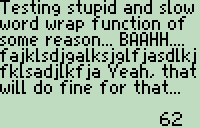
Summery: Draws a text string on the NXT display, but will continue on the next line if the string is too long. This is done without breaking a word into two halves, it only breaks the string at spaces, preventing awkward looking text. Tabs are also handled correctly.
A custom made ricfont with variable width is used. The font is 8 pixels high (7px above the baseline, 1px beneath) and have a default width of 5 pixels.

Requirements: Enhanced firmware 1.28 (because of FontTextOut()) and the file “ASCII_7px.ric” present on the NXT.

Changes in this version

I had left a rather serious bug in the previous version which caused it to frequently break the string at wrong places.

The most significant change is the speed. I have optimized it in a few places which results the example string (in the screenshot) now only takes 76 msec to compile and render where it preciously took 109 msec. An improvement of about ~30% and the method to archive this was nothing special. I manually converted to if and one for statements at crucial places to NBC code instead of letting the NXC compiler do it. It is not an assembler optimization, I just do want the compiler should have done but fails to do properly (in terms of efficiency).
30% slower because of bad compilation… -__-

Update – v0.5.1

A few extra optimizations…

Speedtest: 62 ms

Downloads:

NXC source v0.5.1

Font file


« Previous PageNext Page »